Kubernetes: Enable Local Development with Hot Reloading Using Kind
Working with Kubernetes locally can sometimes feel tricky, especially when you’re developing microservices and want to see how everything fits together. Traditional methods can be slow, costly, and frustrating, with long waits before you see your changes in action.
A great solution to this problem is Kind (Kubernetes IN Docker) combined with any hot-reloading framework. We can extend the Kind configuration to map your local project directories directly into the running pods. This means any changes made are immediately reflected in the cluster itself.
This keeps things simple, and gives you instant feedback — all without complicated setups or constant rebuilds, and new images.
Let’s build an example…
Setting Up A Quick Example
Let’s start with a simple project structure:
./project
./project/service1
./project is our root project directory, and for demonstration purposes, we only have 1 service: ./project/service1.
Creating the Example Service
Let’s create that service using Bun, a JavaScript runtime that allows for hot reloading, but you could use any tooling that supports hot reloading to accomplish the same thing.
Ensure that Bun is installed on your system, and then within our ./project/service1 Then, let’s run the following command.
bun initI’ve chosen React and Tailwind from the init wizard, but you can choose what you like.
Creating the Kind Configuration file
Inside the root ./projectfolder, create a configuration file named kind-config.yml.
kind: Cluster
apiVersion: kind.x-k8s.io/v1alpha4
nodes:
- role: control-plane
  extraMounts:
  - hostPath: ./service1
    containerPath: /service1
  extraPortMappings:
  - containerPort: 3000
hostPort: 3000extraMounts: This mounts your local directories into the Kind node.hostPath: Path on your local development machine.containerPath: Corresponding path to be mounted inside the Kind node.extraPortMappings: Exposes container ports on your host for external access.containerPort: Port used internally by the Kind node. — We will have to ensure our service is exposed to this port.hostPort: Port exposed on your local machine.
Creating the Kind Cluster
Ensure you have Kind and Docker installed and Docker running. Then, within the root ./projectfolder, run the following command:
kind create cluster --config kind-config.ymlThis will create an empty Kubernetes cluster in a single container.
Deploy Your Pod with Hot Reloading
In your sub-project (e.g., ./project/service1), create a Kubernetes pod manifest file named pod.yml:
kind: Pod
apiVersion: v1
metadata:
  name: hot-reload-demo
spec:
  containers:
    - name: dev
      image: oven/bun:1
      workingDir: /service1
      command:
        - bun
        - dev
      ports:
        - containerPort: 3000
          hostPort: 3000
          name: http
      volumeMounts:
        - mountPath: '/service1'
          name: 'workspace'
      resources:
        limits:
          cpu: '1'
          memory: 1Gi
  volumes:
    - name: workspace
      hostPath:
        path: /service1
Note: You don’t need a Dockerfile here, as we’re directly mounting your local project directory into the pod.
This example is tailored to our Bun service example. Notice how we pull the relevant oven/bun:1 image to ensure our container has bun tooling, and then the same command you would use locally to start a development instance with hot reloading. However, you can change these to suit your project if you’re using something else.
Looking at our other properties that make this work:
workingDir: Sets the working directory inside the pod container, where commands execute.volumeMounts: Mounts directories from the Kind node into your container.mountPath: Directory inside the container.name: Identifies the volume reference.volumes: Defines external volumes accessible to the pod.hostPath: Path on the Kind node, not your local pc, to mount. This should reference the same directory as theextraMounts.containerPathin the kind configuration file.containerPort: The port exposed by our service within the container.hostPort: The port that should be exposed to our Kind cluster container. This should reference the same port asextraPortMappings.containerPortwithin our kind configuration file.
The next thing to do is apply your pod file to your Kind cluster:
kubectl apply -f ./project/service1/pod.ymlThat’s it!! 🎉
If you go to http://localhost:3000, you should see our React application. This is the instance running inside the cluster.
If you now go and save a change to something within the React application at ./project/service1 You should see the change instantly reflected.
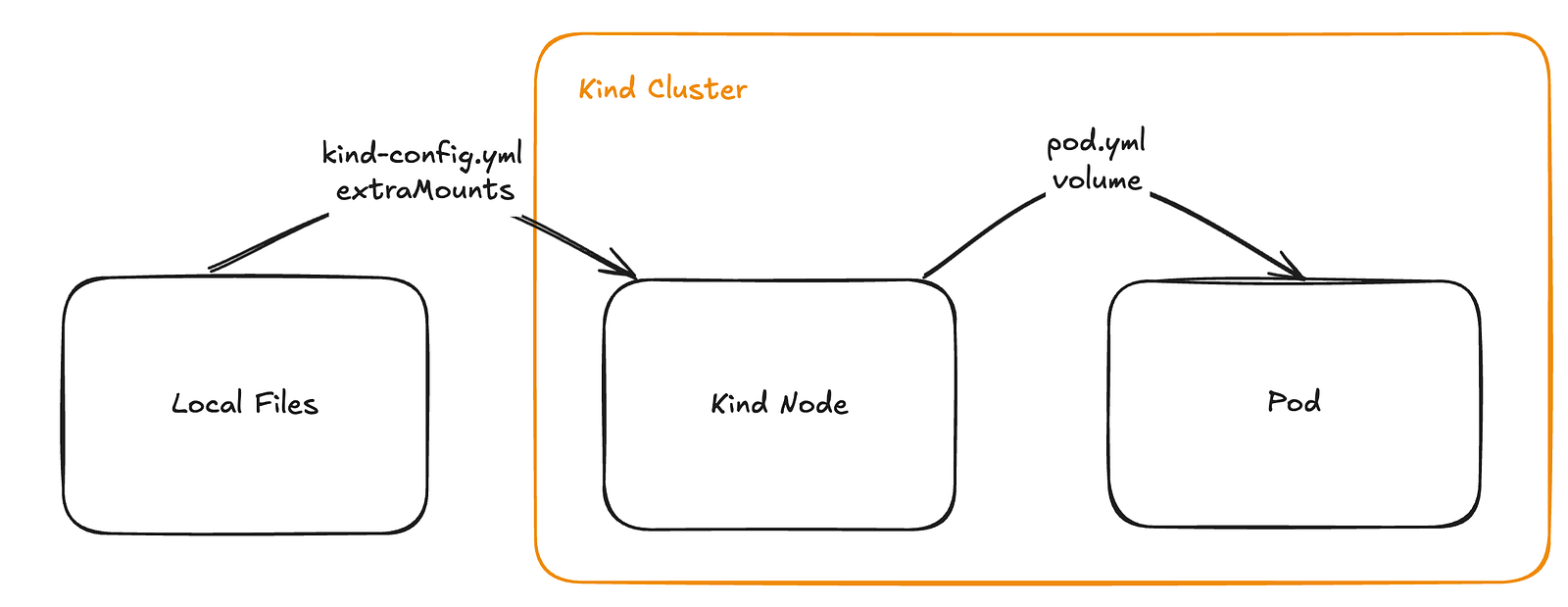
- Kind Mounting (First Hop):
Your local./service1directory is mounted to/service1inside the Kind node viaextraMounts. - Pod Mounting (Second Hop):
The/service1directory in the Kind node is mounted into the pod container viavolumeMountsandvolumes. - Working Directory in Pod:
The pod’sworkingDirensures the hot reload command (bun dev) runs in the correct directory, accessing your local files.
Local Kubernetes development becomes significantly more streamlined and efficient by leveraging Kind and hot reloading.
Hope this helps!